How to Change a Samsung Refrigerator Water Filter
Quick answer
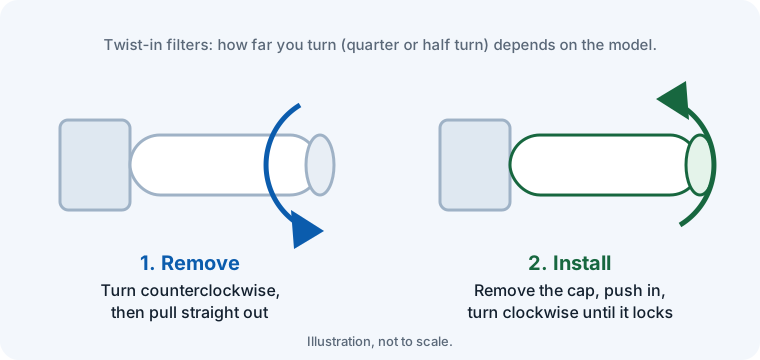
Open the filter cover inside the fridge, turn the old filter counterclockwise until it releases and pull it straight out. Remove the cap from the new filter, push it in and turn it clockwise until the lock symbol lines up with the indicator line. Run several gallons of water through the dispenser, then hold the Filter Reset button for about 3 seconds.
Which filter does your Samsung fridge use?
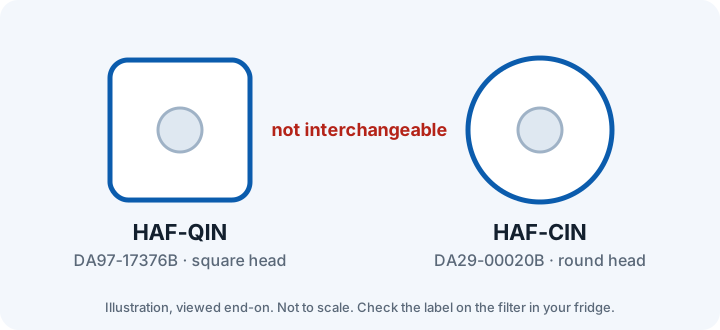
Most current Samsung refrigerators use one of two filters. The HAF-QIN (DA97-17376B) has a square-shaped head and is used in most newer French door and side-by-side models. The HAF-CIN (DA29-00020B) is round and is used in many older French door models.
The easiest way to be sure is to look at the label on the filter that is in your fridge now, or type your model number into our filter finder. A square filter will not fit a round housing, and the other way around.
Where is the filter?
On most Samsung models the filter sits inside the fresh-food compartment, usually near the top on the right, behind a small cover. On some models it is lower down in the compartment. If you can't find it, the filter location is shown in your owner's manual.
If the water filter is leaking
- Turn off the water supply to the fridge, then remove the filter.
- Check the filter and its housing for cracks or damage. Replace a damaged filter, or one that isn't a genuine Samsung filter.
- Check the O-rings at the top of the filter. Worn or damaged O-rings stop it sealing properly.
- Reinstall the filter and turn it until the LOCK mark lines up with the mark on the cover. A filter that isn't turned all the way is the most common cause of drips.
- If it still leaks with a new genuine filter, or water leaks with no filter installed, the housing needs service: contact Samsung support.
Samsung says a genuine filter has a serial number on its body and a rounded grip area where your fingers go.
Step-by-step instructions
- Relieve the water pressure. If your manual recommends it, turn off the water supply, then press the dispenser until water stops flowing. Keep a small towel under the filter for drips.
- Remove the old filter. Open the filter cover. Turn the old filter counterclockwise (usually a quarter to half turn) until it releases, then pull it straight out.
- Prepare the new filter. Take the protective cap off the new filter. Check that the part number matches the old one.
- Install the new filter. Push the new filter straight into the housing and turn it clockwise until it stops and the lock symbol lines up with the indicator line. Close the cover.
- Flush the filter. Turn the water back on if you shut it off. Dispense several gallons of water to clear air and loose carbon. Sputtering and cloudy water at first are normal.
- Reset the filter light. The light does not reset by itself. On most models, hold the Filter Reset button for about 3 seconds until the indicator changes. See our Samsung reset guide for touchscreen and Family Hub models.
After you change the filter
- Check the housing for drips after a few minutes. A leak almost always means the filter isn't turned all the way to the locked position, or the cap was left on.
- Slow flow right after a change is usually trapped air. Keep dispensing for another minute or two.
The right filter for your Samsung fridge
Samsung HAF-QIN (DA97-17376B)
Fits RS27T5200SR, RF27T5201SG, RF28R7201SR, RS22T5201SR, RF32CG5400SR, RF32CG5300SR, RF29BB8600QL, RF28T5001SR, RF27T5241SR.
As an Amazon Associate I earn from qualifying purchases. We verify the genuine filter only. Non-genuine results aren't checked by us: confirm the listing names your model and an NSF/ANSI certification.
Samsung DA29-00020B (HAF-CIN)
Fits RF263BEAESR, RF263TEAESR, RF28HMEDBSR, RF28JBEDBSR, RF28HFEDTSR, RF28HFEDBSR, RF25HMEDBSR, RF23HCEDBSR, RF4287HARS, RF261BEAESR.
As an Amazon Associate I earn from qualifying purchases. We verify the genuine filter only. Non-genuine results aren't checked by us: confirm the listing names your model and an NSF/ANSI certification.
Don't see your model? Search by model number or browse all Samsung models.
Frequently asked questions
How often should I change my Samsung water filter?
Samsung recommends about every 6 months. The filter light is on a 6-month timer, so change the filter when it turns red or sooner if flow slows or the water tastes off.
Do I need to turn off the water to change a Samsung filter?
It's not always required, but Samsung's guide recommends shutting off the supply and running the dispenser until the flow stops. It reduces spills.
Why won't my new Samsung filter go in?
Check the shape. HAF-QIN filters have a square head and HAF-CIN filters are round, and they are not interchangeable. Also make sure the protective cap is off.
Can I use a cheaper compatible Samsung filter?
Many work, but Samsung recommends genuine filters. If you buy a compatible one, choose one certified to NSF/ANSI standards that lists your exact model.
Related guides
Sources
Steps can vary by model and production year. When in doubt, follow your owner's manual.