How to Replace an LG Refrigerator Water Filter
Quick answer
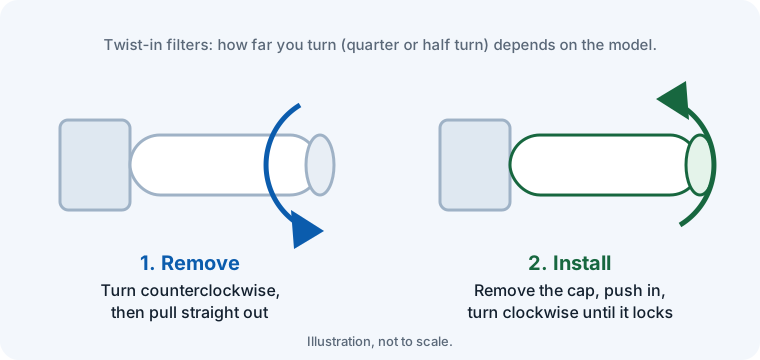
Open the filter cover inside the fresh-food compartment, turn the old filter counterclockwise and pull it out. Remove the cap from the new filter, insert it and turn it clockwise until the lock mark lines up with the reference line. Flush about 2.5 gallons in short bursts, then hold the Filter button for about 3 seconds to reset the light.
Which LG filter do you have?
- LT1000P (ADQ747935): many newer LG French door models, such as the LFCS27596S and LMXS28626S. Usually at the top inside the fresh-food compartment.
- LT700P (ADQ36006101): many LG French door models, such as the LFDS22520S. Usually behind a cover at the top of the fresh-food compartment.
- LT800P (ADQ73613401): many LG side-by-side models, such as the LSXS26326S.
The filter number is printed on the filter. LG filters look similar but are not interchangeable, so check your model in our filter finder before buying.
Where is the water filter on an LG refrigerator?
LG says twist-in filters on its French door and side-by-side models are usually in the upper right corner of the fresh-food compartment, and sometimes in the bottom left corner of the fresh-food compartment. Look for a small cover; on some models it pulls down. If you can't find it, the filter location is shown in your owner's manual.
How to reset the LG water filter light
- Press and hold the Water Filter button on the control panel for about 3 seconds, until you hear a chime or the indicator turns off. On some models the button is labelled ICE PLUS or Express Frz. instead.
- Press the center of the button's label. The panel's soft buttons may not register an off-center press, and a few models need 3 to 5 seconds.
- If nothing happens, the control panel may be locked. Hold the Lock button for 3 seconds to unlock it, then try again.
- Some LG models only allow a reset once the filter indicator has counted down to zero, even if you changed the filter early.
- Wi-Fi models linked to the LG ThinQ app can also reset it in the app: Useful Features, Filter Management, Filter Usage, then reset.
Step-by-step instructions
- Prepare. Turn off the water supply if your manual recommends it, and press the dispenser to release pressure. Keep a towel handy.
- Open the filter cover. Open the cover over the filter inside the fresh-food compartment. On some models it pulls down.
- Remove the old filter. Turn the filter counterclockwise until it releases and pull it straight out.
- Install the new filter. Remove the cap from the new filter, insert it and turn it clockwise until the lock mark lines up with the reference line. Close the cover.
- Flush the filter. LG recommends flushing about 2.5 gallons: dispense for 30 seconds, pause for 60 seconds, and repeat for about 5 minutes.
- Reset the filter light. Press and hold the Filter (or Filter Reset) button on the display for about 3 seconds until the indicator resets.
After you change the filter
- Check for leaks after a few minutes. If water drips, the filter isn't fully turned to the lock mark.
- Sputtering water is normal at first and stops once the air is flushed out.
The right filter for your LG fridge
LG LT1000P Refrigerator Water Filter
Fits LFCS27596S, LMXS28626S.
As an Amazon Associate I earn from qualifying purchases. We verify the genuine filter only. Non-genuine results aren't checked by us: confirm the listing names your model and an NSF/ANSI certification.
LG LT700P Refrigerator Water Filter
Fits LFDS22520S, LFX28968ST.
As an Amazon Associate I earn from qualifying purchases. We verify the genuine filter only. Non-genuine results aren't checked by us: confirm the listing names your model and an NSF/ANSI certification.
LG LT800P Refrigerator Water Filter
Fits LSXS26326S, LMXS30776S.
As an Amazon Associate I earn from qualifying purchases. We verify the genuine filter only. Non-genuine results aren't checked by us: confirm the listing names your model and an NSF/ANSI certification.
Don't see your model? Search by model number or browse all LG models.
Frequently asked questions
How often should I replace my LG water filter?
LG filters are rated for about 6 months or 200 gallons, whichever comes first.
Do I need to flush a new LG water filter?
Yes. LG recommends about 2.5 gallons in short cycles to clear air and loose carbon before drinking.
How long do I hold the LG filter reset button?
About 3 seconds on most LG models, until you hear a chime or the light goes off. A quick press usually only shows the filter status.
Why won't my LG water filter light reset?
The control panel is usually locked: hold the Lock button for 3 seconds to unlock it first. Some models also won't reset until the filter indicator has reached zero.
Related guides
Sources
Steps can vary by model and production year. When in doubt, follow your owner's manual.